Photo Uploading Tip – Rename first

Home RV Happy Hour Forums Website Help and Bug Reports Photo Uploading Tip – Rename first

Tagged: photo upload rename, edit

This topic contains 1 reply, has 2 voices, and was last updated by Profile photo of Norma Norma 10 months, 3 weeks ago.

Viewing 2 posts - 1 through 2 (of 2 total)
  • Author
    Posts
  • #2384
    Profile photo of Ray
    Ray
    Keymaster
    • Vancouver Island
    Cheers: 7 223

    Hi, just a tip for everyone uploading photos. If you rename them first you can add a descriptive name to them and it will appear like a caption. In windows you can rename by right clicking and clicking on “Rename”.

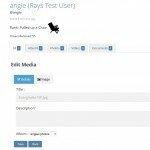
    You can also edit the Title and Descriptions of your photos from within RV Happy Hour in a few ways. From your own Profile page click Media link and then hover over and click the photo to edit or open the photo and in the photo viewer click edit.

    Attach to this post are some examples of where to edit.

    I’m really liking all the interesting photos being uploaded, good job!

    I’ll work on some more comprehensive help guides soon.

    Cheers Ray


    Attachments:
    • Also can edit from photo viewer

    • Click Edit to rename

      Click Edit to rename

    • Then Add Title and Description

      Then Add Title and Description

    LoveYourRV.com
    #2392
    Profile photo of Norma
    Norma
    Participant
    • Texas
    Cheers: 5 902

    I changed title/description, but will rename first from now on.  Thanks for the info, Ray!

    1996 Honorbuilt Eldorado C320 "Lurch" | Chewbacca is my co-pilot

Viewing 2 posts - 1 through 2 (of 2 total)

You must be logged in to reply to this topic.