
@Username Usage tip

Home RV Happy Hour Forums Website Help and Bug Reports @Username Usage tip

Tagged: @ username ,mention

This topic contains 0 replies, has 1 voice, and was last updated by Profile photo of Ray Ray 1 year, 3 months ago.

Viewing 1 post (of 1 total)
  • Author
    Posts
  • #1098
    Profile photo of Ray
    Ray
    Keymaster
    • Vancouver Island
    Cheers: 7 229

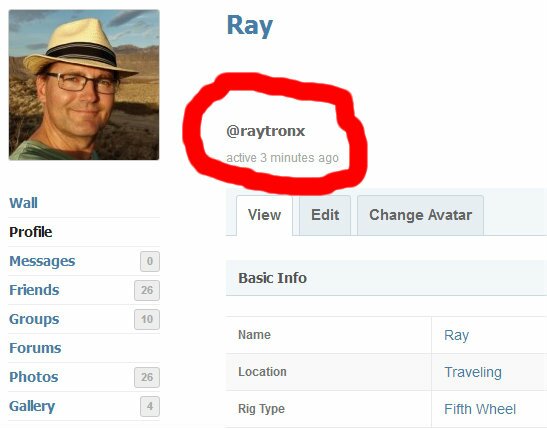
    There are two names associated with each RVHH member, the log in username which shows in their profile as an @username and the regular name that usually shows up.

    You can alert a member that you have mentioned them in an activity update or forum post by using their @username. To find the members @username go to their profile page and look to the right of their Photo avatar. You can see here mine is @raytronx

    If you use the @username they will be alerted that they have been mentioned. This will occur automatically in some cases like if you write a message on their Wall feed or by using the Public Message button on their Profile page.

    LoveYourRV.com
Viewing 1 post (of 1 total)

You must be logged in to reply to this topic.